
How to Deposit Crypto Safely on CryptoPlay.io: The 2026 "Zero-Loss" Guide
Moving from traditional "fiat" casinos to CryptoPlay.io offers a significant upgrade in transaction speed and privacy. However, the nature of blockchain technology means there is no "undo" button. Sending funds to the wrong network doesn't just result in a delay—it leads to a permanent loss of assets.
Following a strict, fail-proof system is the only way to fund an account like a professional and avoid the common pitfalls that catch beginners off guard.
1. Flexible Balances: Play in Your Local Currency
A standout feature of the CryptoPlay.io platform is its highly customizable balance display. While all bets and transactions are settled in their cryptocurrency equivalent, players can choose how they view these values for better clarity. By visiting the Wallet Settings, users can toggle the "Display Crypto in Fiat" option.
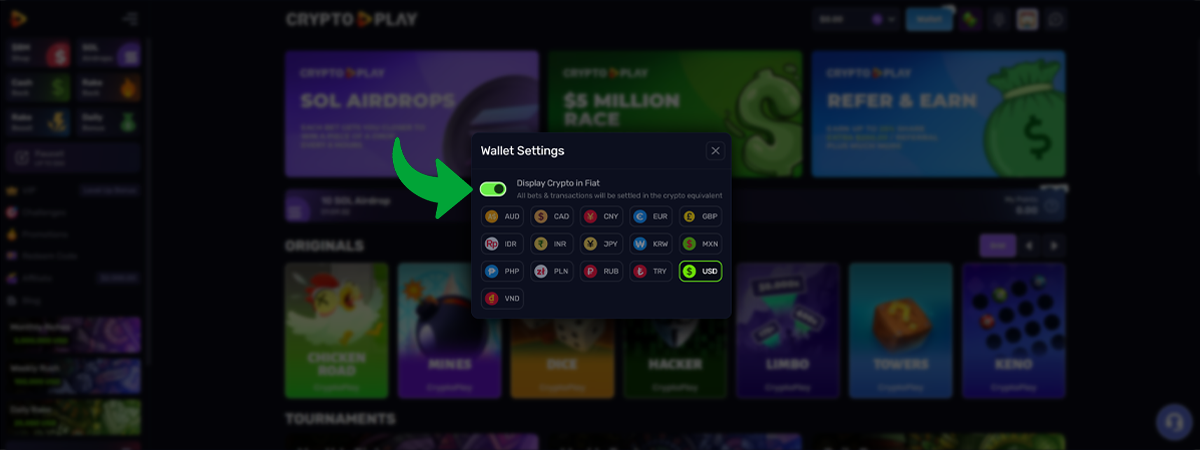
This allows the balance to be shown in a wide range of global currencies, including USD, EUR, GBP, CAD, AUD, JPY, CNY, and many others. This flexibility is particularly helpful when managing risk during fast-paced sessions on Mines or Plinko, as it allows for precise bet sizing in a familiar unit of account.
The Deposit Process:
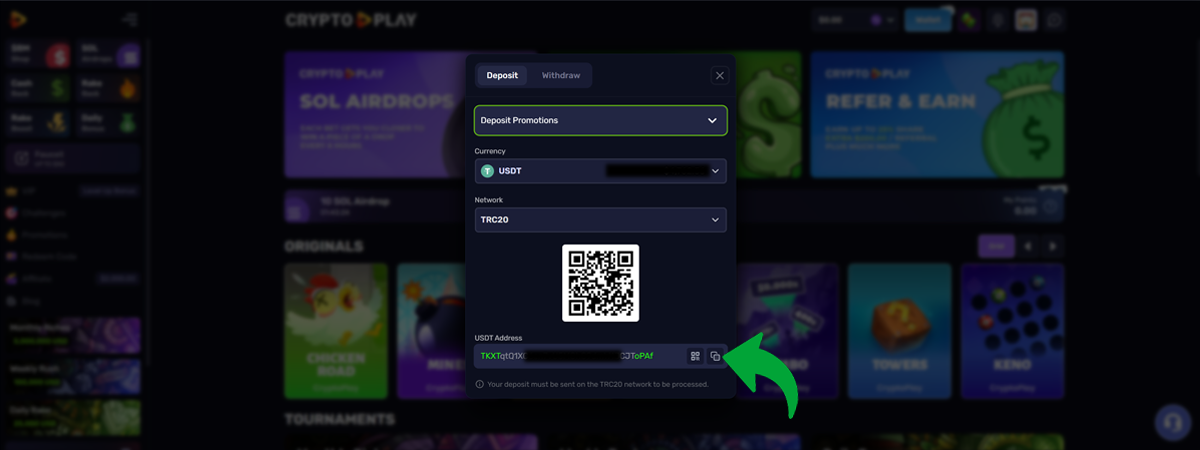
- Navigate to the Cashier: Open the Deposit Tab to view your personal wallet addresses.
- Select a Currency: CryptoPlay supports 13 major assets: Bitcoin (BTC), Solana (SOL), Ethereum (ETH), Tether (USDT), Tron (TRX), Binance Coin (BNB), USD Coin (USDC), Ripple (XRP), Dogecoin (DOGE), Litecoin (LTC), Bitcoin Cash (BCH), Cardano (ADA), and Polygon (POL).
- Stability Strategy: To avoid market volatility while playing, depositing stablecoins like USDT or USDC ensures the balance remains consistent regardless of market swings.
2. Matching the Network
The most common cause of lost funds is a network mismatch. When selecting a coin like USDT, CryptoPlay provides a specific address tied to a specific network. It is vital to ensure the sending wallet matches the receiving network exactly.
- ERC-20: The Ethereum network. Highly reliable but carries higher gas fees.
- TRC-20: The Tron network. Often the preferred choice for players due to its speed and low cost (usually $1).
- Solana / BSC / POL: These options are ideal for smaller, frequent deposits as fees are typically negligible.
Critical Rule: If an external wallet is set to send via Tron (TRC-20), the TRC-20 address must be copied from the CryptoPlay deposit screen. If these do not match, the funds will be lost on the blockchain.
3. The "Bookend" Verification Method
Manual typing of wallet addresses is high-risk. One character error will void the transaction. Instead, use the following verification method:
- Copy the Address: Click the "Copy Address" icon on the CryptoPlay deposit screen.
- Paste into the Wallet: Enter this into the "Send" field of the personal wallet.
- Verify the "Bookends": Compare the first 4 characters and the last 4 characters of the address in the wallet against those shown on the CryptoPlay screen. (Example: If the screen displays 0x7b...99a2, the wallet must show the exact same sequence).
4. Blockchain Confirmation Times
Balances update once the transaction reaches the required number of confirmations (usually 1 to 3 depending on the coin).
- SOL / LTC / TRX: Usually confirmed and visible in under 2 minutes.
- BTC: Can take 10–20 minutes depending on network traffic.
- Troubleshooting: If a deposit has not appeared after 30 minutes, locate the TXID (Transaction ID) in the wallet history and provide it to the CryptoPlay 24/7 Live Chat. The support team can track the status immediately.
Essential Safety Protocols
- The Small Test Deposit: For first-time users, it is best practice to send a minimum "test" amount first. Once the funds reflect in the account balance, the rest of the bankroll can be moved safely.
- Using a Private Wallet: To maintain maximum privacy, consider sending crypto from an exchange to a private wallet (like Exodus or Trust Wallet) first, then to CryptoPlay.
- URL Verification: Always confirm the browser address bar reads https://cryptoplay.io to protect against phishing sites.
Next Steps
With a funded account, players are eligible for various site benefits. Visit the Promotions page to check for active Solana Airdrops or to join the Monthly Riches tournament. To claim rewards like Cashback or Rakeback as you play, visit the Rewards Lobby.
For those looking for immediate action, the Originals category—featuring games like Chicken Road, Dice, and Hacker—provides the fastest gameplay experience on the platform.